Meetings
Record the call or the room. Calendar matching names the meeting and lists who was there. Mark Follow up as you go.
You leave with decisions, action items and a follow-up email draft, with every claim traceable to the moment it was said.
For iPhone, iPad, Apple Watch and Mac
Recording and transcription work offline. Nothing leaves your device unless you want it to.
noFriction records meetings, classes and everyday life, writes the transcript on your device as people talk, and lets you go back to any moment. Mark what matters as it happens, then turn any recording into notes and a review guide.
Coming soon to the App Store for iPhone, iPad, Apple Watch and Mac. "Get notified" opens an email to casey@nofriction.io; reply-free, one message at launch.


Free to download. noFriction Pro is a separate subscription.
See how it works · Free to record and transcribe · No account
How it works
Everything up to the notes runs on your device. AI is Apple's on-device model, or one endpoint you enter yourself.
Tap Record on your iPhone, Apple Watch or Mac. Say what it is: Meeting, Class or Personal, and how long.
The transcript appears as people talk. Apple speech recognition on iPhone and iPad, a local speech model on the Mac. No cloud.
One tap marks a moment Important. Pick Question, or Follow up, On the test or Remember, and add a note.
Go back to any moment. On the Mac, Rewind shows the screen that was up next to what was said.
Notes in the style of the recording, and a review guide with flashcards and a practice quiz. With Apple on-device AI or your own endpoint.
Meetings, classes and everyday life
Say what the recording is and noFriction follows: the notes, the third mark and the review guide change with the type.
Record the call or the room. Calendar matching names the meeting and lists who was there. Mark Follow up as you go.
You leave with decisions, action items and a follow-up email draft, with every claim traceable to the moment it was said.
Set a 60- or 90-minute limit, put it in a Notebook like "BIO 101", and mark On the test when the instructor says so.
Before the exam: a study guide with key terms, flashcards and a practice quiz that jumps to the moment the professor explained it. On the Mac, Make lesson turns the lecture into a course with a final exam.
A doctor's visit, a contractor walkthrough, a talk, an idea on the drive home. Personal covers everything else. Mark Remember on the detail you'd lose.
A summary, the key points and the to-dos, and the exact words when you need them: "order the tiles by Friday".
Rewind
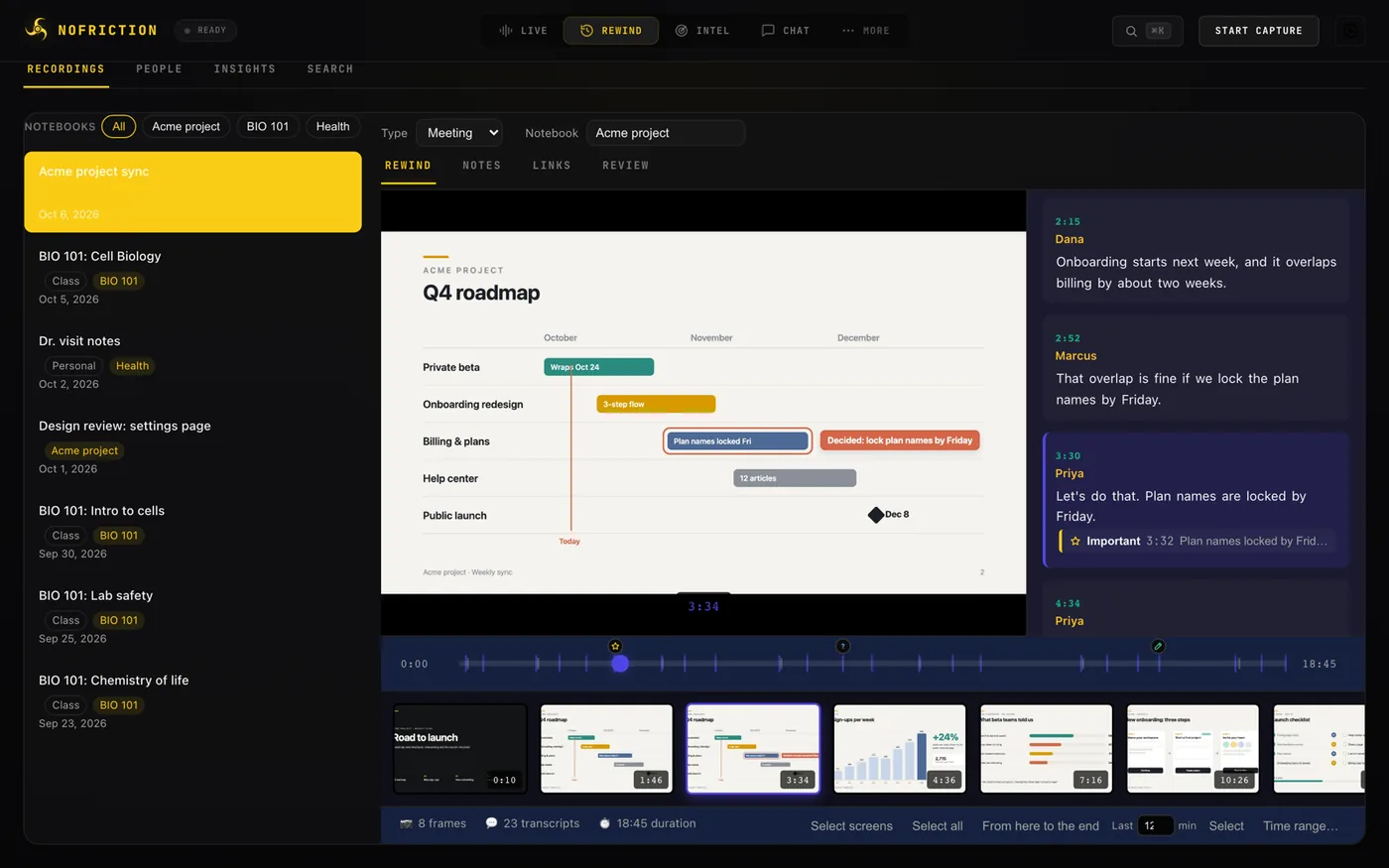
On the Mac, noFriction keeps the screens you choose next to the transcript. Pick any second of a meeting or a lecture and see the slide that was up and the words that went with it.
One tap for Important. Then Question, or the mark for the type: Follow up for a meeting, On the test for a class, Remember for everything else, with a note. On the Mac, Control-Option-Command-M marks even while another app is in front.
Group recordings into "Acme project", "BIO 101" or "Health". Filter chips show one Notebook at a time. On Apple Watch, pick from your recent Notebooks before you record.

Choose 15, 30, 60 or 90 minutes, or no limit. It stops by itself at the end, after a warning with +15 min. Meetings can also stop when the calendar event ends and the room goes quiet.

Web addresses said in a recording appear in its Links list with the time they were said. Add your own references: the agenda, the reading, the deck. Nothing is fetched.

Summary, key terms, flashcards, a practice quiz with explanations and Jump to this moment, and questions to ask. Called a study guide for a class. Export flashcards as a CSV file that popular flashcard apps can import, or the guide as Markdown.

Take courses in the Lessons tab, fully offline: explainers, checkpoints, mastery for every concept, spaced review, a final exam and a printable certificate. It starts with a stoichiometry course. With Pro, Make lesson turns a class recording into a course of its own: explanations, worked examples, common mistakes, checkpoint questions and a final exam.

Hand a recording to someone as a folder or a zip: a document and a printable web page with the notes, the screens and photos you pick with captions, the marks, the links and the transcript. With Pro, the AI finds highlights (quoted word for word), picks pictures and writes captions. On the Mac, File → Export Recording… (⌘E). Export is free and never expires.

Fix a word. Delete a line with five seconds to undo. Or Strike from the record: the words are removed everywhere, including the saved audio, and only a marker remains. Share any recording as text, export flashcards and guides, or export everything as JSON on the Mac; with Pro, each recording is also saved as Markdown in your Obsidian vault.


Apple Watch
The watch only records. Say what it is, how long and which Notebook, mark moments with a tap, and the audio goes to your iPhone, which transcribes it on the device. The watch keeps each recording until your iPhone confirms it arrived.


Privacy
noFriction hosts no AI. Use Apple's on-device model (iOS 26 or macOS 26 and later, with Apple Intelligence), and nothing leaves the device. Or enter one OpenAI-compatible endpoint, with your own key if it needs one: a model on your Mac, on your network, or a service you have an account with. The app asks before it sends anything to a public endpoint and shows the destination. Keys live in the Keychain and are never shown again.
Connecting takes one step: Sign in with OpenRouter and the key comes back on its own, Paste key and connect for a key you already have, or, on the Mac, Find AI on this Mac for Ollama or LM Studio.
Pricing
Recording and microphone transcription stay free on every device. noFriction Pro turns every recording into notes, a review guide and answers, and keeps your iPhone and Mac in sync. It starts with a 1-week free trial.
$0
$0.99 / month
or $5.99 / year · 1-week free trial
| Feature | Free | Pro |
|---|---|---|
| Record on iPhone, iPad, Mac and Apple Watch | Yes | Yes |
| On-device microphone transcription | Yes | Yes |
| Screens, marks, Notebooks, timed recording | Yes | Yes |
| Rewind, search, links, calendar and people | Yes | Yes |
| Editing, Delete and Strike, sharing, JSON export | Yes | Yes |
| Export… a recording as a folder or zip | Yes | Yes |
| Take lessons (Mac) | Yes | Yes |
| Notes, follow-up emails and topics | — | Yes |
| Review guides: flashcards and practice quiz | — | Yes |
| Chat with your recordings | — | Yes |
| Sync between iPhone and Mac | — | Yes |
| Transcribe what's playing (iPhone) | — | Yes |
| Make lesson from a class (Mac) | — | Yes |
| Export to Obsidian (Mac) | — | Yes |
| Price | $0 | $0.99/month or $5.99/year, 1-week free trial |
FAQ
Yes. Recording and transcription run on your device with no connection. On the Mac, the speech model is downloaded once during setup. AI also works offline with Apple's on-device model, or with a model running on your own computer.
No. There is nothing to sign up for and no noFriction server. Subscriptions go through your Apple Account.
It is Apple's privacy-label term: the app sends nothing to us or to any partner. There are no analytics, no crash-reporting SDK and no tracking. Content leaves your device only when you choose: to the AI endpoint you set up, in an export or share, or from your Apple Watch to your own iPhone. Privacy policy.
Your choice of two: Apple's on-device model (iOS 26 or macOS 26 and later on a device with Apple Intelligence), or one OpenAI-compatible endpoint you enter yourself: its base URL, model name and, if it needs one, your key. noFriction hosts no AI model and includes no service. Connecting is one step: Sign in with OpenRouter, Paste key and connect, or Find AI on this Mac. The app asks before sending recording content to a public endpoint.
Free: recording on every device, on-device microphone transcription, screens, types, Notebooks, timed recording, marks, links, Rewind, search, calendar and people, editing, Delete and Strike, Export…, taking lessons on the Mac, sharing and JSON export. Pro: notes, follow-up emails, topics, review guides, Make lesson on the Mac, Chat, Sync between iPhone and Mac, Transcribe what's playing on iPhone and Export to Obsidian on the Mac. Pro is $0.99 a month or $5.99 a year with a 1-week free trial, in the United States.
The watch records; your iPhone transcribes. Choose the type, length and Notebook on the watch, mark moments with a tap, and the audio is sent to your iPhone in the background. The watch deletes its copy only after the iPhone confirms it has it. Discreet mode keeps the watch screen nearly black for lectures and quiet rooms.
Many schools require the instructor's permission to record a class, and some require classmates' consent. Check your school's policy. noFriction reminds you the first time you record a class.
Laws vary. In many places everyone in the conversation must agree. noFriction reminds you to tell people; getting consent is up to you.
Yes, for free: Export… saves any recording as a folder or zip with its notes, the screens and photos you pick and the transcript, on iPhone, iPad and Mac. You can also share a recording as text, and export everything as JSON on the Mac. With Pro, the Mac also saves each recording as Markdown in your Obsidian vault, flashcards export as CSV and review guides as Markdown.
With noFriction Pro, yes, between your iPhone and your Mac, directly on your Wi-Fi: recordings, transcripts, notes, marks and screens. There is no server and no cloud; you pair once with a QR code. Without Pro, each device keeps what it recorded.
noFriction is coming to the App Store for iPhone, iPad, Apple Watch and Mac. Get one email at launch, or try the beta today.
Coming soon to the App Store for iPhone, iPad, Apple Watch and Mac. "Get notified" opens an email to casey@nofriction.io; reply-free, one message at launch.
Free to download. noFriction Pro is a separate subscription.